Docker Containers Don’t Exist: What Actually Happens When You run Docker
Overview
Docker does not exist.
That’s a provocative claim, especially for something most of us use every single day. But by the end of this post, you’ll understand exactly why it’s true—and why that’s actually a good thing.
Watch the companion walkthrough: Jump to video
Quick disclaimer about the environment
In this post (just like in all upcoming ones) everything is done using Fedora Linux OS. If you use MacOS or Windows, your mileage may slightly vary as they use virtualized version of Linux under the hood. For such cases, please refer to the official documentation of your systems.
The Setup: Run Nginx and Watch What Happens
For the further demo, we need one important setting: live-restore: true to be set in your /etc/docker/daemon.json configuration:
sudoedit /etc/docker/daemon.json
{
    "live-restore": true
}
Let’s restart Docker service:
sudo service docker restart
Next, we’ll pull a standard Nginx image and run it in detached mode, mapping host port 8080 to container port 80. This gives us a real running container to dissect.
docker pull nginx:latest
docker run --rm --name=my-nginx -p 8080:80 -d nginx
What’s Actually Running on Your Host?
Now comes the interesting part. Let’s examine which processes appear on the host once the container is up:
ps -ef --forest | grep -E 'docker|containerd|nginx' | grep -v grep
Notice the tree structure? Docker’s runtime isn’t a monolith—it’s a multiprocess architecture by design. The chain flows from dockerd to containerd to containerd-shim and finally to nginx. Each layer has a distinct purpose.
The Docker Client: Just a REST API Wrapper
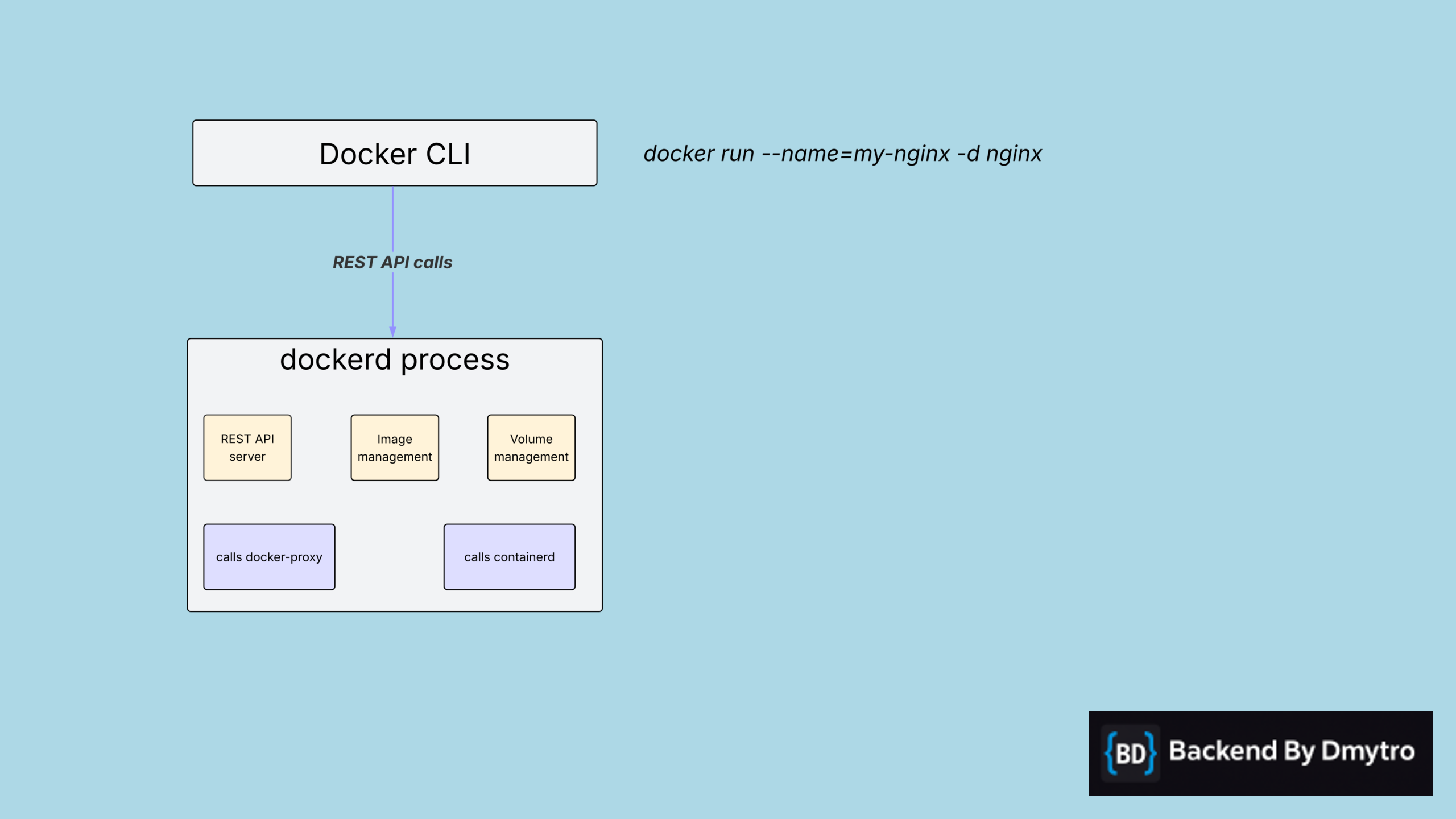
When you execute a Docker command—whether through the CLI or a GUI tool—the Docker client translates it into REST API requests and sends them to the dockerd daemon. This daemon acts as a REST API server, exposing endpoints you can explore in the official API documentation.
Here’s where it gets interesting: dockerd doesn’t actually run your containers. Instead, it focuses on what it does best—managing images and volumes—while delegating container runtime operations to containerd. Think of dockerd as the orchestrator, not the executor.
There’s also an often overlooked component in this architecture: docker-proxy. This process is spawned by dockerd to handle port mapping between your host OS and containerized processes. It’s the bridge that makes your containers accessible from the outside world.
containerd: The Standardized Runtime Underneath
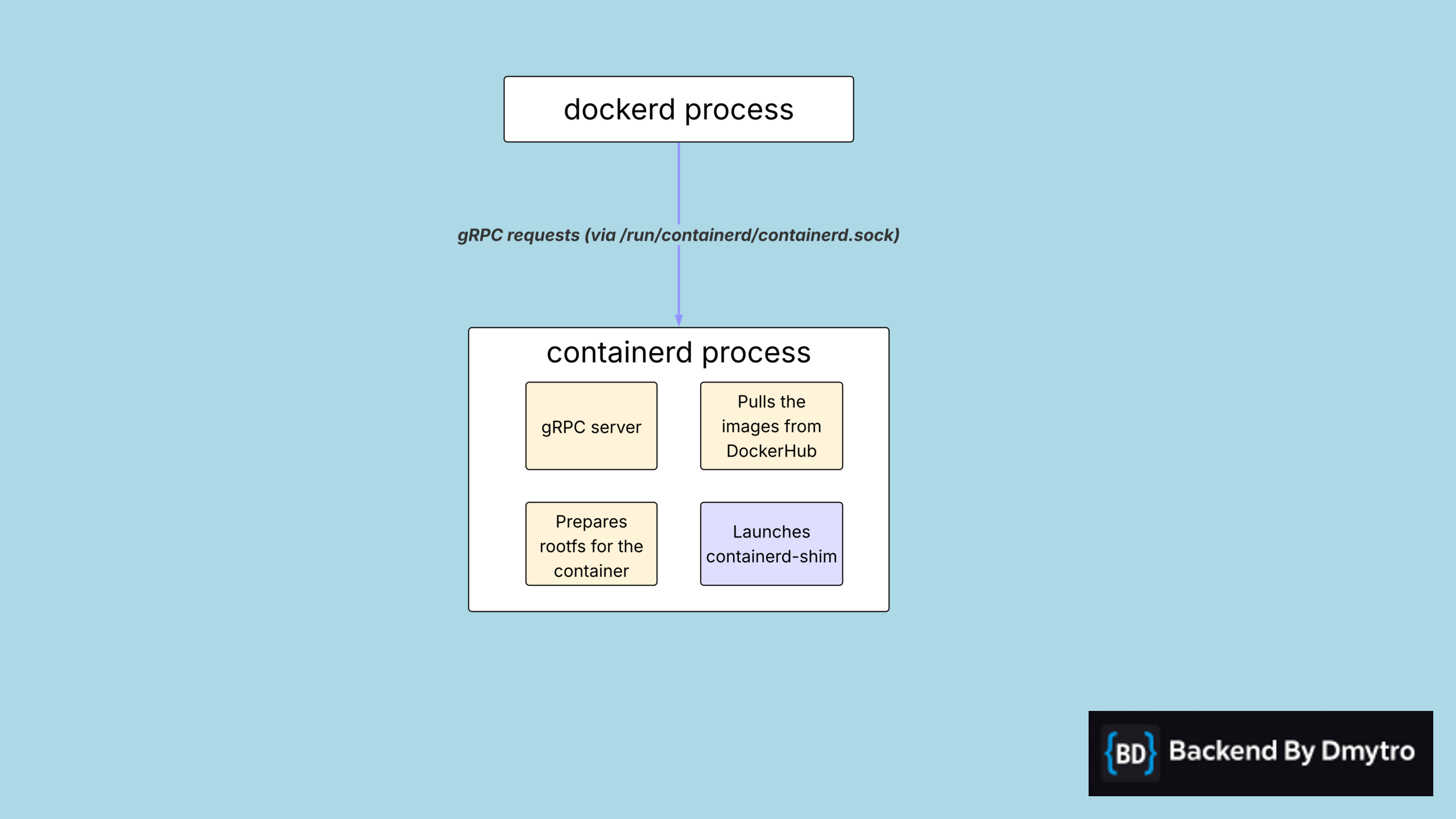
Moving down the stack, we arrive at containerd—the actual container runtime. What makes containerd particularly powerful is its adherence to the Open Container Initiative (OCI) specification. This isn’t just Docker’s internal tool—it’s a standardized runtime that powers Kubernetes, Podman, and various other container platforms. This standardization is why you can seamlessly move workloads between these ecosystems.
containerd exposes a gRPC API and handles three critical responsibilities:
- It pulls container images from registries like Docker Hub
- It prepares the root filesystem that your container will use in its isolated environment
- It spawns a
containerd-shimprocess for each container
Why the shim? That’s next—but here’s the key insight: it allows your containers to keep running even if containerd itself restarts. This architectural choice is what makes Docker containers truly resilient in production.
containerd-shim: The Guardian That Keeps Your App Alive
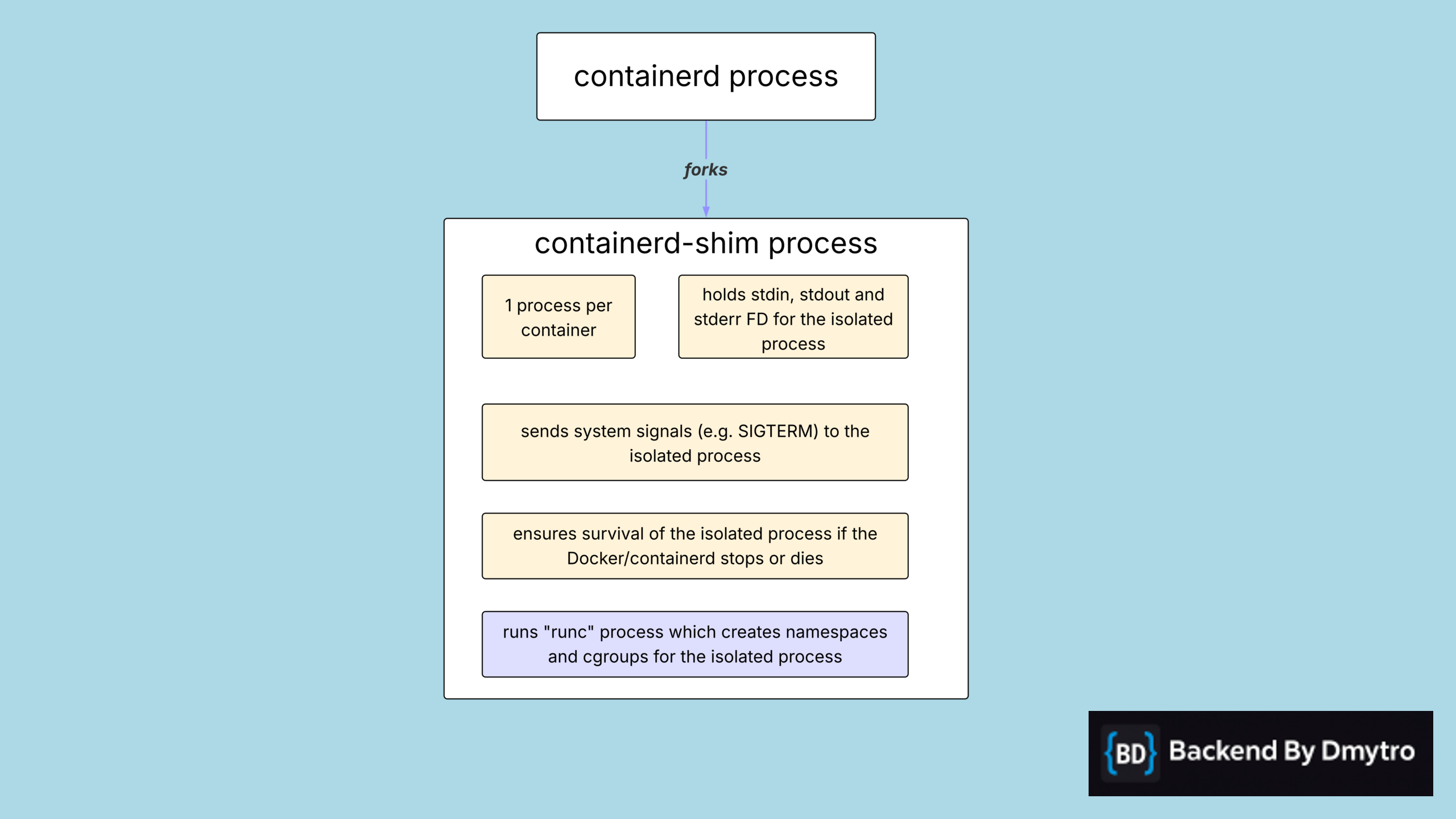
The containerd-shim is the unsung hero of container resilience. Each container gets its own dedicated shim process, acting as a permanent guardian for your application. Here’s how the lifecycle works:
The shim first invokes runc, a lightweight utility that sets up the Linux primitives your container needs—namespaces for isolation and cgroups for resource limits. Once runc completes its setup, it exits immediately. Its job is done.
The shim then takes over, using the clone system call to spawn your actual application process (Nginx, PostgreSQL, whatever you’re running). But it doesn’t just spawn and forget. The shim maintains ownership of the process’s file descriptors—stdin, stdout, and stderr—which is how you can attach to a running container and see its logs in real time.
The shim also acts as a signal relay, forwarding commands like SIGTERM or SIGINT from containerd down to your application. And here’s the critical part: because the shim is the direct parent of your container process, your application keeps running even if containerd or dockerd crashes or restarts. This decoupling is what makes Docker production-ready.
Proof #1: Stop the Docker Service
Let’s prove this separation works in practice. First, stop the Docker service entirely:
sudo systemctl stop docker
Now check the processes again:
ps -ef --forest | grep -E 'docker|containerd|nginx' | grep -v grep
Notice anything? The containerd, containerd-shim, and nginx processes are still running. Your containers can run independently of the Docker engine itself.
Proof #2: Kill containerd
Let’s go further. Kill the containerd process:
sudo kill $(pgrep -o containerd)
The containerd-shim and Nginx are still alive. That’s the true power of the shim—it ensures container processes don’t die if something happens to the Docker engine or containerd process.
Without this setting, dockerd termination sends SIGTERM to containers. With it enabled, containers survive, and containerd respawns when dockerd restarts. This setting is essential for zero-downtime upgrades of the Docker engine.
Debunking the “Black Box” Myth: The Filesystem Isn’t Magic Either
Now let’s address another common myth: that a Docker container is a black box, completely isolated from the host. We’ve seen that’s not true for processes—but what about the filesystem?
The answer might surprise you. By accessing /proc/<pid>/root from the host, you can see the container’s entire root filesystem. Containers provide isolation, but there are no hard security boundaries against a host root user.
First, grab the Nginx process ID:
NGINX_PID=$(pgrep -o nginx)
echo $NGINX_PID
Now read a file from what is effectively the container’s root filesystem—directly from the host:
sudo cat /proc/$NGINX_PID/root/etc/nginx/nginx.conf
This works because containers aren’t virtual machines. They’re isolated processes running on the same kernel, and the host can peer into their environments via /proc.
What This All Means
Docker isn’t a magical virtual machine-like abstraction. It’s a carefully orchestrated stack of processes—dockerd, containerd, containerd-shim, and runc—working together to provide isolation and reliability. Understanding these internals isn’t just academic—it’s key to debugging production issues, optimizing performance, and making architectural decisions.
The next time someone tells you Docker containers are isolated virtual machines, you’ll know better. They’re processes. Just processes. And that’s exactly what makes them powerful.
If you want more deep dives like this into the tools we use every day, follow along for more posts that pull back the curtain on how modern infrastructure actually works.
Watch the video version
Prefer YouTube app/comments? Open on YouTube